Tuesday, 16 June 2009

Visual Studio 2005 short cuts

Its important to know your tools. So here follows a quick list of short cuts for VS2005. (for a complete list (found it after I wrote everything below link)


Clipboard HistoryCtrl+shift+V
Opens object browserCTRL+K, CTRL+R
Delete the selected line.CTRL+Shift+L
cuts the selected line into the paste buffer.CTRL+L
Transpose Words CTRL+Shift+T
Show Solution ExplorerCTRL+ALT+L
Show Toolbox CTRL+ALT+X
CTRL+BREAK Cancel Build
Build SolutionCTRL+SHIFT+B
Start without debugging CTRL+F5

Debugging


Step Into F11
Step Over F10
New Breakpoint CTRL+B
Next error or warning location F8
CTRL+SPACE Complete Word, this one's brilliant - no need to type in the full variable name type in few letters and hit this key combination
Comment selected area CTRL+K,CTRL+C
Uncomment selected area CTRL+K,CTRL+U


Search


Search and replace in entire solution Ctrl+Shift+H
Incremental search Ctrl+I
Incremental search backwards Ctrl+shift+I
Find Next F3
Find Previous SHIFT+F3


Plan to expand it, until I find the one that I am looking for.

Friday, 27 February 2009

Easy way to make UML Sequence Diagrams

It is often very useful to make an UML sequence diagram, to explain functionality to a customer or colleagues (or simply to yourself). Here is a simple and easy site to make simple ones:

http://www.websequencediagrams.com/

You can even embed on in your own site, by following the tutorial here link

an example could be:


Alice->Bob: Authentication Request

Thursday, 8 January 2009

Default values of minOccurs and maxOccurs

The default values of minOccurs and maxOccurs is 1. Meaning that the following XML schema element allows zero or one element:

<xs:element name="realmCode" type="CS" minoccurs="0"></xs:element>

while:

<xs:element name="realmCode" type="CS">
</xs:element>

allows one and only one.

W3 specification

Thursday, 18 December 2008

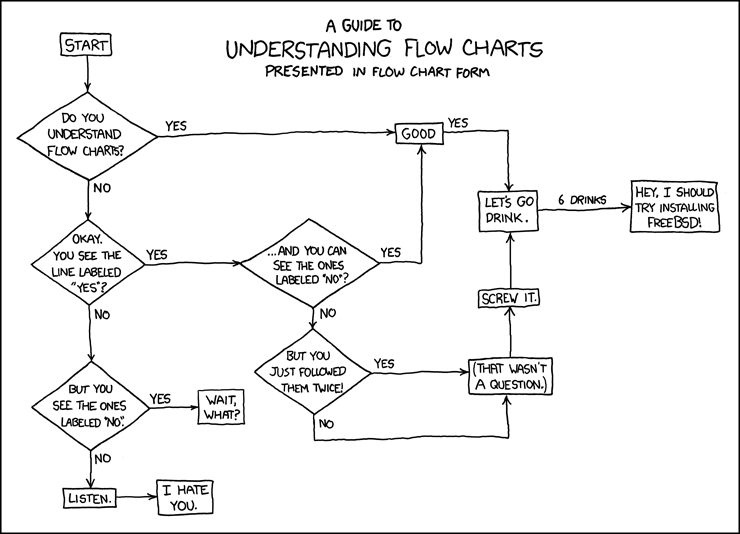
Guide to understanding flow charts

click on picture to get it in full size:

Monday, 27 October 2008

Have WSDL or XSD; Need c# Class Interface

When you want to access a external web service inside you .NET c# code, you take the WSDL and generate a stub class.

To do this you can use the WSDL.exe which can be found inside the Visual studio folders (in my case here: "C:\Program Files\Microsoft Visual Studio 8\SDK\v2.0\Bin\wsdl.exe" )


Microsoft link: link


If you on the other hand wants to use some classes described in an XML-file, you should instead use xsd.exe

C:\projects\ebXML>xsd.exe rim.xsd /classes

that will autogenerate .NET c# classes for each element in the xsd.

Thursday, 31 July 2008

Find dublicates when SQL is your friend

Just to remember it another day. If you want to find which elements there is more then one time.


SELECT CODE
FROM table
GROUP BY CODE
HAVING count(CODE) > 1


It helped me a lot, so I hope you, my reader can utilise it as well.

Tuesday, 1 July 2008

Add entry macro in my word document

I am using a word document, to document may daily tasks and doings. And as the good geek I am, I wanted to implement a macro in MS word to make a day entry at the punch of a short cut.

After playing alot with the anything-but-intuitive vb I finally finished the following macro:

Sub addEntry()
'
' addEntry Macro
' Macro recorded 4/7/2008 by kim
'
' write headline ("Diario di bordo ")
Selection.Font.Name = "Courier New"
Selection.Font.Bold = True
Selection.Font.Underline = True
Selection.TypeText Text:="Diario di bordo "
Selection.InsertDateTime DateTimeFormat:="dd/MM/yyyy HH:mm:ss", _
InsertAsField:=False, DateLanguage:=wdItalian, CalendarType:= _
wdCalendarWestern, InsertAsFullWidth:=False
Selection.TypeParagraph
Selection.Style = ActiveDocument.Styles("Normal")

' add bold headline ("Should-does:")
Selection.Font.Bold = wdToggle
Selection.TypeText Text:="Should-dos:"
' add point lists.
Selection.TypeParagraph
Selection.MoveUp Unit:=wdLine, Count:=1
Selection.TypeParagraph
Selection.MoveDown Unit:=wdLine, Count:=1
Selection.Style = ActiveDocument.Styles("List Bullet")

' if it is friday, add "Write Status report" to bullet list.
today = Weekday(Date$, vbMonday)
If (today = vbFriday) Then
Selection.TypeText Text:="Write Status report"
End If

Selection.TypeParagraph
Selection.MoveRight Unit:=wdCharacter, Count:=1
Selection.MoveLeft Unit:=wdCharacter, Count:=1
' remove type type.
Selection.Range.ListFormat.RemoveNumbers NumberType:=wdNumberParagraph
End Sub

Which does exactly as I have described in the comments (the stuff in green). And produces the following in my diary.


Diario di bordo 01/07/2008 17:43:57

Should-dos:

·

·


(sorry the mess of HTML (if you look in "document source" of this HTML, its pretty ugly, but I just did a copy paste from Word).

If its a friday, it will add the "Write status report" to the list of "Should dos"